PsychoPy on a Raspberry Pi
Running PsychoPy experiments on a Raspberry Pi 3: an inexpensive, reproducible setup that is quiet and easy to clone, with clear limits on timing and stimulus complexity.
Why a Raspberry Pi
I set up a Raspberry Pi 3 Model B as the core of a psychology experiment, mainly for three reasons:
- Cost and reproducibility. The setup is cheap, and the whole system lives on a micro-SD card. Other researchers can copy it, and you can run several experiments in parallel.
- Fast to clone and switch. Swapping setups means swapping cards.
- Quiet. A MacBook fan spins up whenever it drives an external monitor, which was the decisive factor.
Installation
PsychoPy runs on Raspbian. The version in the apt repository is old (1.83.04), so I installed a newer one by hand, which meant adding a few extra Python dependencies. A mild overclock and passive cooling help performance.
What the benchmark showed
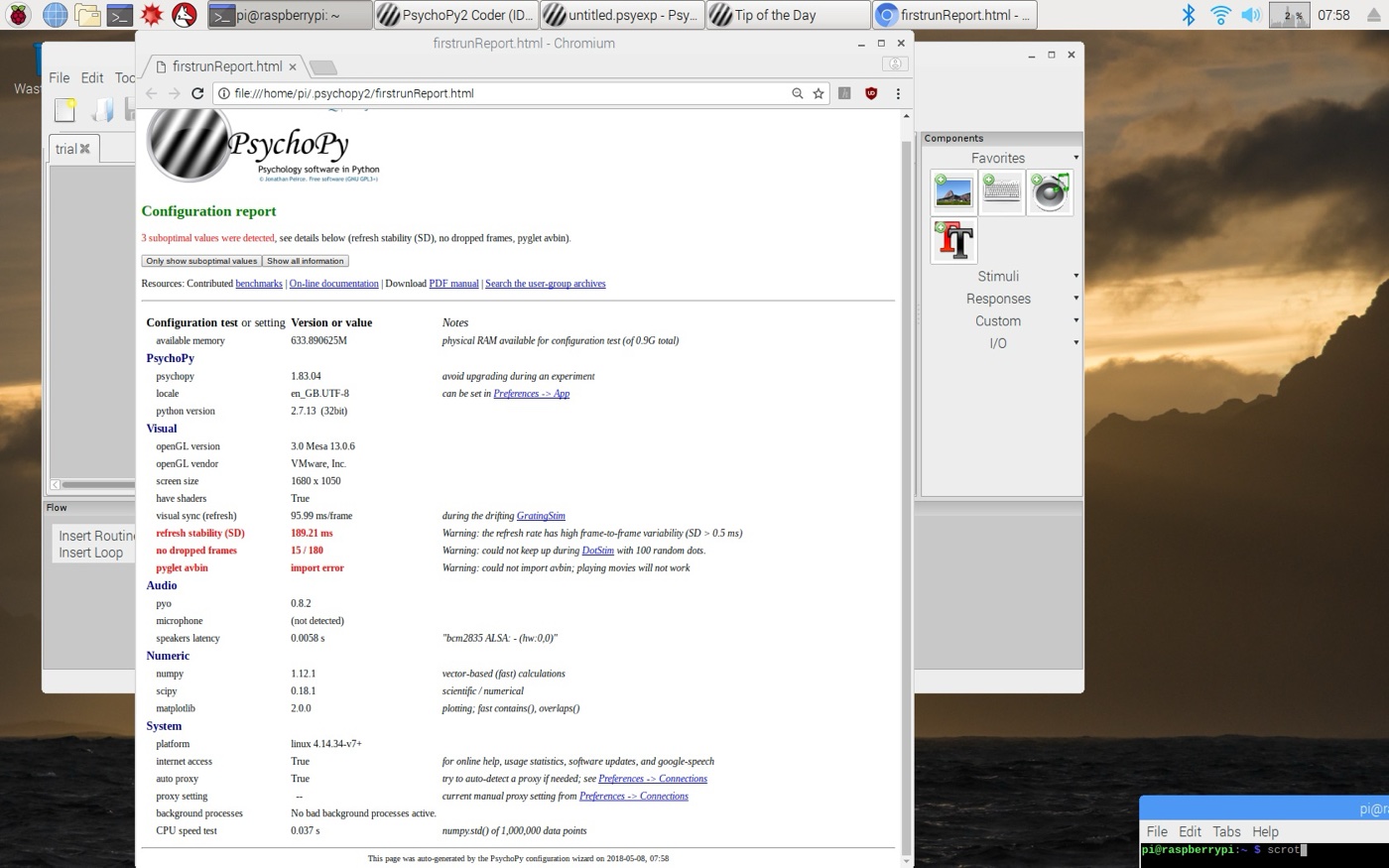
The Pi is still slow, and the configuration report made it clear that low-level vision research on complex stimuli is out of the question. On my overclocked Pi the refresh stability was 189 ms, where it should be below 0.5 ms. Dropped frames and the missing pyglet avbin also show up in the report.
Simple experiments with simple, static stimuli still work, with much lower variability. You need to test this for each experiment during design.
Backing up data
SD cards fail, so I wouldn't keep important data on the Pi for long. If the experiment room has internet access, push each result to cloud storage as soon as it's written. Rclone works well on Raspbian and supports the major cloud services. The pattern I used:
win.close()
try:
    system("rclone copy /home/pi/Documents/yourExperiment/" + singleFileName + " dropbox:destinationFolder/")
    system("rclone copy /home/pi/Documents/yourExperiment/" + resutFileName + " dropbox:destinationFolder/")
except:
    print("error uploading!")
core.quit()
Upload only the latest results rather than overwriting the whole destination folder each time.